Abandon Mobile Carts

Why Shoppers Abandon Mobile Carts, and How to Fix It

Shoppers browse on their phones more than ever. Yet many stores still lose sales at the final step. Mobile checkout optimization solves this exact problem.

A slow or confusing checkout page pushes buyers away fast. Business owners and marketers often blame ads or pricing. However, the real issue frequently sits in the checkout flow itself.

This guide breaks down why smartphone shoppers abandon carts. You will learn practical fixes for forms, payments, speed, and trust signals. Each tip is simple enough for teams of any size to apply.

By the end, you will have a clear plan to reduce mobile cart abandonment. This plan works for online retailers, service providers, and subscription businesses alike.

Mobile shopping now makes up a large share of total online sales. Therefore, checkout performance directly shapes revenue, not just user experience. Let’s look at where the drop-offs happen first.

Why Mobile Checkout Drop-offs Happen

Small Screens Create Friction

Phone screens are small, and typing is slow. Long forms with many fields frustrate users quickly. Consequently, many shoppers give up before finishing their order.

Tiny buttons and cramped layouts add to the problem. Users misclick, get frustrated, and leave the page entirely. This is one of the most common causes of mobile drop-offs.

Keyboard pop-ups make the issue worse. When a keyboard covers half the screen, users lose sight of important buttons. Designers must account for this shift in visible space.

Poor spacing between fields also causes accidental taps. A shopper trying to tap “continue” may hit the wrong field instead. Small design details like this quietly damage conversion rates.

Slow Load Times Kill Conversions

Speed matters more on mobile than on desktop. Users expect pages to load in under three seconds. If checkout pages lag, shoppers assume something is broken.

As a result, they often close the app or tab immediately. Every extra second of load time increases the chance of losing that sale.

Mobile networks vary widely in speed and reliability. A shopper on weak signal may experience delays a desktop user never sees. Therefore, checkout pages need extra performance buffer for these conditions.

Large images, heavy scripts, and unnecessary plugins all slow things down. Each one adds load time that mobile shoppers notice immediately.

Lack of Trust Signals

Shoppers hesitate when a checkout page looks unfamiliar or unsafe. Missing security badges or unclear return policies raise doubt. Similarly, unexpected costs at the last step break trust instantly.

This hesitation often leads to cart abandonment, even from otherwise interested buyers.

New or unfamiliar brands face this challenge most. Shoppers need extra reassurance before entering card details on an unknown site. Reviews, ratings, and clear contact information all help build that confidence.

Abandon Mobile Carts

Proven Fixes for Mobile Checkout Optimization

Simplify the Checkout Form

Ask only for essential details during checkout. Name, address, and payment information should be enough for most orders. Extra fields can wait until after purchase.

Use auto-fill wherever possible. Detecting a saved address or card reduces typing significantly. Additionally, group related fields together so the form feels shorter.

Guest checkout is another key fix. Forcing account creation before purchase drives many shoppers away. Let people buy first and create an account later if they choose.

Speed Up Page Load Times

Compress images and scripts on checkout pages specifically. This page matters more than any other for speed. Even small delays here cause noticeable drop-offs.

Use a content delivery network to serve pages faster across regions. Furthermore, remove any unnecessary scripts or trackers that slow down this critical step.

Test your checkout speed on real phones, not just desktop emulators. Actual mobile networks behave differently than office Wi-Fi connections.

Offer Multiple Payment Options

Shoppers have preferred payment methods. Some want digital wallets, while others prefer cards or buy-now-pay-later options. Offering choice reduces friction at the final step.

Digital wallets like Apple Pay and Google Pay speed up mobile transactions significantly. These options remove manual typing almost entirely, which shoppers appreciate.

Buy-now-pay-later services also attract price-sensitive shoppers. Offering this option can increase average order value for certain product categories. However, be transparent about any fees involved with these plans.

Design for Thumbs, Not Mice

Buttons should be large enough to tap easily with one thumb. Place primary actions within easy reach of the average hand grip. This small change reduces accidental taps considerably.

Sticky “buy now” buttons that stay visible while scrolling also help. Shoppers should never need to scroll far to complete their purchase.

Build Trust Throughout Checkout

Display security badges near payment fields clearly. This reassures shoppers that their data is protected. Similarly, show your return policy link without requiring extra clicks.

Avoid hidden fees that appear only at the last step. Surprise costs are one of the biggest reasons shoppers abandon their cart. Show full pricing early instead.

Testing and Measuring Checkout Performance

You cannot fix what you do not measure. Track your mobile cart abandonment rate monthly, at minimum. This number reveals whether your changes are actually working.

Use heatmaps to see where users hesitate or misclick. These tools show exactly where friction happens on the page. Therefore, you can prioritize fixes based on real behavior.

Run A/B tests on major changes, such as form length or button placement. Small tweaks can sometimes bring surprisingly large improvements in conversion rate.

Also, review checkout analytics by device type separately. Mobile and desktop shoppers often behave quite differently during checkout.

Session recordings offer another useful view. Watching real shoppers navigate your checkout can reveal issues that reports alone miss. Even a handful of recordings can highlight recurring pain points.

Set a clear benchmark before making changes. Compare your abandonment rate against industry averages for your product category. This context helps you judge whether your checkout truly needs work.

Common Mistakes to Avoid

Do not assume desktop design works fine on mobile. Screens, thumbs, and attention spans differ greatly between devices. A responsive design alone is often not enough.

Avoid asking for unnecessary information during checkout. Every extra field is a chance for someone to give up. Keep the process as lean as possible.

Meanwhile, do not ignore error messages. Confusing or vague errors leave users stuck and unsure what went wrong. Clear, specific messages help shoppers fix issues and complete their purchase.

Finally, avoid neglecting post-launch reviews. Checkout optimization is not a one-time project. Shopper habits change, and your checkout flow should evolve too.

Another mistake involves ignoring accessibility. Some shoppers rely on screen readers or larger text settings. A checkout page that ignores these needs loses potential customers unnecessarily.

Do not overlook cross-browser testing either. Mobile browsers render pages differently at times. A checkout flow that works on one browser may break on another without proper testing.

Conclusion

Mobile checkout optimization is one of the highest-impact changes a store can make. Small screens, slow pages, and low trust all drive shoppers away quickly.

Simplify your forms, speed up your pages, and offer flexible payment options. Additionally, build trust with clear security signals and honest pricing throughout.

Measure your results consistently and keep testing new ideas. This steady, data-driven approach reduces mobile cart abandonment over time.

Every fix, however small, adds up. Start with the biggest friction points first, and momentum will follow from there.

Frequently Asked Questions

1. What causes most mobile checkout drop-offs?

Long forms, slow load times, and low trust signals are the leading causes of mobile checkout abandonment.

2. How can I reduce mobile cart abandonment quickly?

Offer guest checkout, simplify forms, and add digital wallet payment options for faster mobile transactions.

3. Does page speed really affect mobile checkout conversions?

Yes. Shoppers expect fast load times, and delays of even a few seconds can significantly increase abandonment.

4. Should I require account creation before checkout?

No. Guest checkout typically performs better, since forcing signup adds friction many shoppers avoid.

5. How often should I test my mobile checkout flow?

Review performance monthly, and run A/B tests whenever you make significant changes to the checkout process.

Also Read:
Complete Guide to Measure AI ROI for Beginners

Local Payment Methods vs Global Gateways: A Practical Guide

UPI Complete Guide

UPI Complete Guide: Choosing the Right Payment App

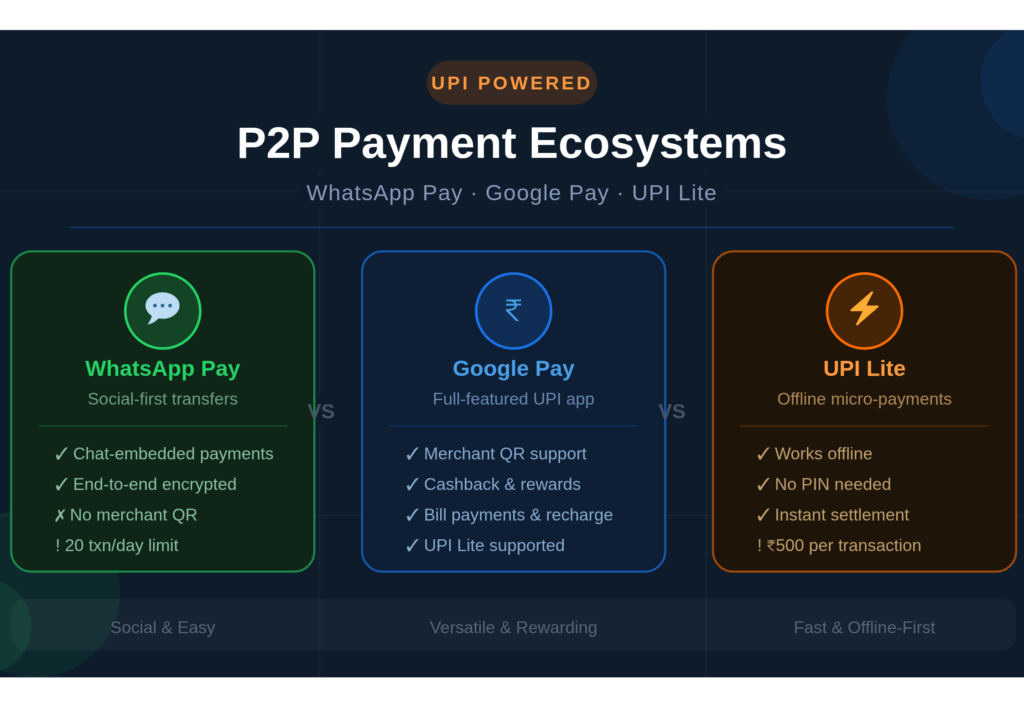
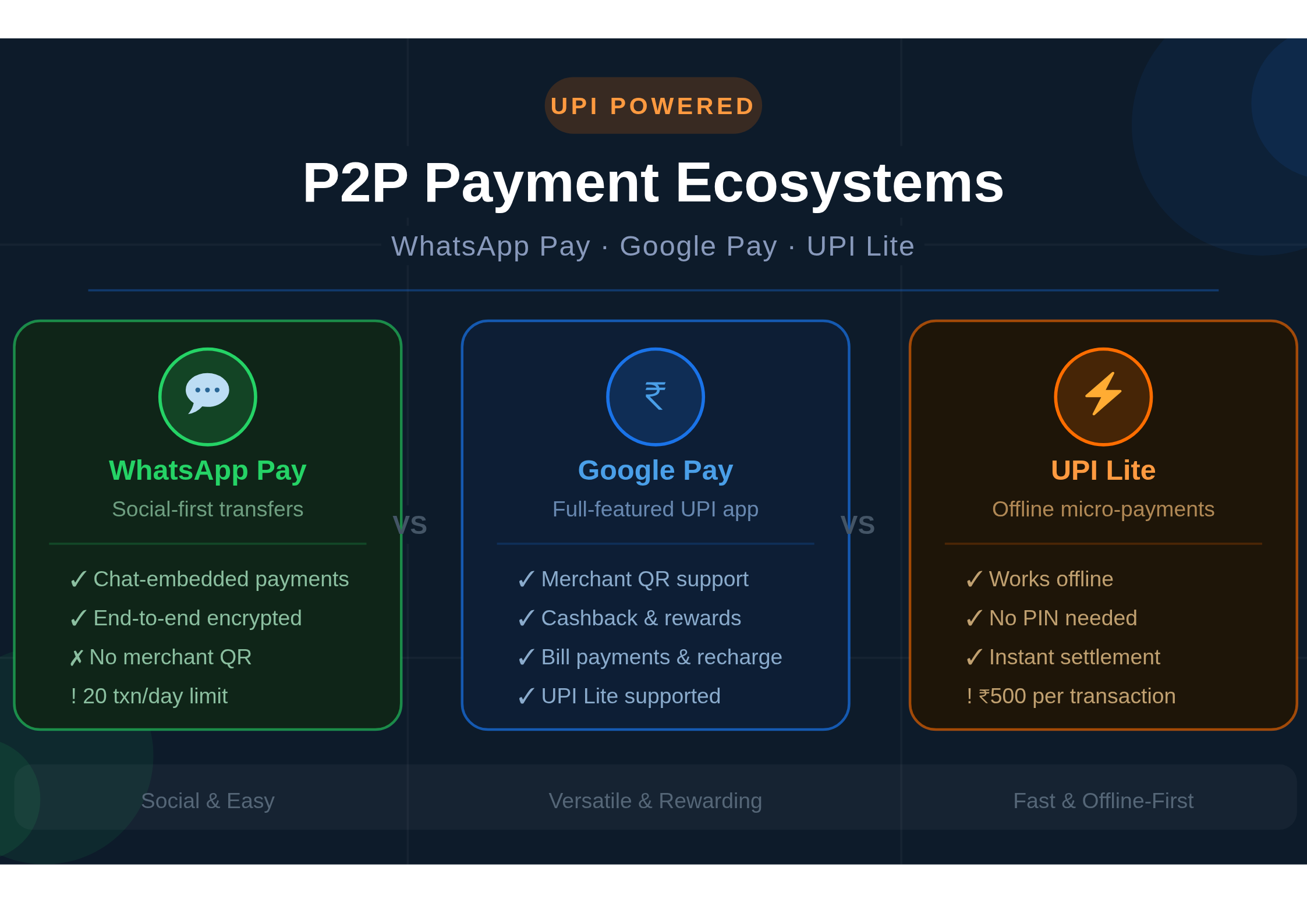
Digital payments in India have gone from a novelty to a necessity. Today, millions of people send money to friends, pay shopkeepers, and split bills — all within seconds, right from their phones. Three platforms stand at the center of this shift: WhatsApp Pay, Google Pay, and UPI Lite. Each one brings something different to the table. So, which one actually deserves a spot on your home screen?

In this blog, we break down these three P2P payment ecosystems side by side. Whether you care about speed, security, offline access, or just ease of use — this guide covers it all.

UPI Complete Guide

What Is a P2P Payment Ecosystem?

Peer-to-peer (P2P) payments allow users to transfer money directly from one bank account to another — no middleman, no waiting, no paperwork. In India, the Unified Payments Interface (UPI) powers most of these transactions. It is built and regulated by the National Payments Corporation of India (NPCI).

Therefore, apps like WhatsApp Pay and Google Pay do not move money on their own. Instead, they ride on top of the UPI infrastructure. UPI Lite, however, is a distinct layer that handles smaller, low-value transactions differently. Understanding this difference is key to choosing the right tool.

Google Pay: The Power Player

Google Pay (formerly Tez) launched in India in 2017. It quickly became one of the most downloaded UPI apps in the country. Even today, it holds a massive market share — and for good reason.

Key Features

Google Pay supports multiple UPI IDs and bank accounts. Users can link up to four bank accounts at once. Consequently, switching between accounts during a payment is easy. The app also supports bill payments, mobile recharges, and merchant QR code scanning.

Moreover, Google Pay uses a layered security model. Every transaction requires a UPI PIN. The app also features a “Safe” area that hides your payment history and account details behind an extra lock. This gives cautious users an added sense of control.

Additionally, the Nearby feature lets users discover and pay nearby businesses quickly. The rewards program — with scratch cards and cashback offers — has long been a crowd-pleaser. Furthermore, Google Pay integrates neatly with other Google services like Gmail and Google Assistant.

Limitations

On the downside, Google Pay requires internet access for every transaction. It also does not support in-app chat or social features. For users who want a more all-in-one experience, this can feel limiting.

WhatsApp Pay: The Social Payment Shortcut

WhatsApp Pay entered the Indian market after a long regulatory battle. Launched fully in 2020, it is now available to over 500 million WhatsApp users in India. The core idea is simple — pay someone directly inside a chat window.

Key Features

WhatsApp Pay is deeply embedded in the messaging experience. To send money, you simply open a chat, tap the attachment icon, and select Payment. As a result, paying someone feels as natural as sending a sticker or a voice note.

The platform supports all major Indian banks and uses UPI for fund transfers. Notably, it also stores transaction history within the chat thread — so you always know who paid whom and when. This makes it especially useful for splitting expenses among friends or family.

From a security standpoint, WhatsApp Pay is compliant with NPCI’s data localization norms. It uses end-to-end encryption for messages and a separate UPI PIN for payments. Nevertheless, some privacy advocates remain cautious about Meta’s data practices.

Limitations

WhatsApp Pay currently caps total UPI transactions at 20 per day, which is lower than Google Pay. It also lacks support for merchant QR codes at the moment. Similarly, advanced features like scheduled payments or bill splitting tools are absent. Still, for casual money transfers within a social circle, it is hard to beat.

UPI Lite: The Offline Game-Changer

UPI Lite is not exactly an app — it is a feature within UPI-enabled apps. Launched by NPCI in 2022, it addresses one of the biggest pain points of digital payments in India: poor network connectivity.

How It Works

UPI Lite works by pre-loading a small amount of money — up to ₹2,000 — into an on-device wallet. From there, you can make payments of up to ₹500 per transaction without needing internet access or a UPI PIN. Each transaction settles instantly on the device, and bank reconciliation happens later in the background.

Consequently, UPI Lite is perfect for small, everyday purchases — a chai at a roadside stall, a newspaper, an auto-rickshaw fare. Because it skips the usual server verification step, transactions process much faster than standard UPI payments.

Availability

Currently, UPI Lite is supported within Google Pay, Paytm, and several bank apps. WhatsApp Pay does not yet offer UPI Lite support, which is a notable gap. However, NPCI plans to expand compatibility across more platforms in the near future.

Limitations

The wallet cap of ₹2,000 limits its use for higher-value transactions. Additionally, users must manually top up the wallet, which can be a minor inconvenience. That said, for micro-transactions in low-connectivity areas, UPI Lite is a genuine breakthrough.

Head-to-Head Comparison

Here is a quick snapshot of how the three platforms stack up against each other:

Feature Google Pay WhatsApp Pay UPI Lite
UPI Support ✅ Full ✅ Full ✅ Lite Only
Offline Payments ❌ No ❌ No ✅ Yes
Social Integration ❌ Limited ✅ Strong ❌ None
Merchant QR ✅ Yes ❌ No ✅ Yes
Transaction Limit ₹1 Lakh/day ₹1 Lakh/day ₹500/txn
Daily Txn Count Unlimited 20 per day Unlimited
PIN Required ✅ Yes ✅ Yes ❌ No
Cashback/Rewards ✅ Yes ❌ Limited ❌ No

Security: How Safe Is Your Money?

Security is a top concern for any digital payment user — and rightfully so. Fortunately, all three platforms operate under RBI and NPCI guidelines, which means they follow strict data handling and fraud prevention standards.

Google Pay uses device-level security, including fingerprint and face recognition. WhatsApp Pay benefits from end-to-end encryption at the messaging layer. UPI Lite, meanwhile, removes the PIN requirement for small transactions — which speeds things up but also shifts responsibility to the user. Therefore, always keep your phone locked when not in use.

Regardless of which app you use, never share your UPI PIN with anyone. Be cautious of collect requests from unknown contacts. And always verify the recipient’s name before hitting confirm.

Which One Should You Use?

The best P2P payment app depends entirely on your lifestyle and needs. Here is a simple breakdown:

Choose Google Pay  if you want a full-featured UPI app with cashback rewards, bill payments, and merchant support. It is the most versatile option overall.

Choose WhatsApp Pay  if you frequently transfer money to friends and family who are already on WhatsApp. The conversational payment flow is smooth and social.

Use UPI Lite  if you make lots of small, everyday payments and live in an area with spotty internet. It is the fastest and most friction-free option for micro-transactions.

In practice, many users rely on more than one. For example, you might use UPI Lite for buying street food, Google Pay for utility bills, and WhatsApp Pay to split dinner with friends. There is no rule that says you must pick just one.

The Future of P2P Payments in India

India’s digital payment sector is growing at a breakneck pace. UPI processed over 13 billion transactions in a single month in 2024. As a result, competition among payment apps is intensifying. Going forward, expect to see smarter AI-driven fraud detection, expanded UPI Lite limits, and deeper integration with e-commerce platforms.

WhatsApp Pay is likely to roll out merchant payment features as Meta expands its Commerce ecosystem in India. Similarly, Google Pay is investing heavily in credit products and BNPL (Buy Now Pay Later) integrations. Meanwhile, NPCI is working on UPI One World — a version designed for foreign visitors to India.

Ultimately, the winner of this race will not be determined by features alone. Trust, simplicity, and network reach will decide which app becomes the default choice for the next billion users.

Final Thoughts

P2P payments are no longer just a convenience — they are the backbone of everyday financial life in India. WhatsApp Pay brings payments into conversations. Google Pay brings rewards and versatility. UPI Lite brings speed and offline access to places that were previously left out. Each platform has carved out its own niche. Together, they are reshaping how a billion people think about money. So go ahead — try all three, see what fits, and take full advantage of India’s world-class digital payments infrastructure.

Read More:

Everything You Need to Know About Payment Gateway Before Launching Your Subscription Box

Regulatory Sandboxes for Fintechs: Opportunities & Risks in India

How Offline payments Secure the Local Economy?

How Offline payments Secure the Local Economy ?

How Offline payments Secure the Local Economy ?

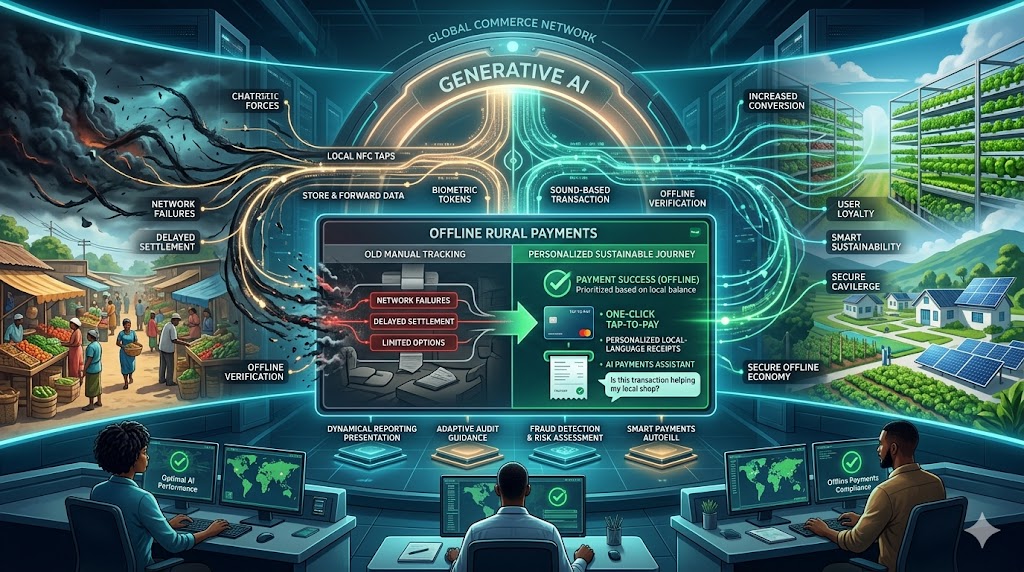
The world is moving toward digital money, but many rural areas still lack fast internet. This creates a big gap for people who want to shop and sell goods. However, new technology is now allowing payments to happen without any data connection. This shift is vital for rural commerce to grow and thrive in 2026. Because these tools are simple and fast, they bring the power of modern trade to everyone. In short, the future of global payments is becoming inclusive and offline.

How Offline payments Secure the Local Economy ?

Why Internet Gaps Slow Down Trade

In many villages, a weak signal can stop a sale in its tracks. Traditional apps often spin and fail when the network is poor. Consequently, many shopkeepers still prefer cash because it never fails. This is because standard payments rely on a constant link to a central bank. Furthermore, customers feel frustrated when they cannot finish a purchase. Therefore, rural markets need a different kind of system to handle their daily payments smoothly.

Another issue is the high cost of data for small transactions. For instance, a farmer might only want to buy a small bag of seeds. If the digital process is too hard, they will stick to physical coins. Thus, the industry is building tools that work over basic radio waves or sound. A smart payments strategy solves this by removing the need for a smartphone. This keeps the local economy moving even in the most remote locations.


Solutions for the Offline Economy

Store-and-forward tech is a vital tool for rural success. This allows a device to collect payments while offline and sync them later when a signal is found. Because this removes the wait time, it builds instant trust between the buyer and the seller. Furthermore, sound-based tech can send encrypted data through a basic phone speaker. This means you can finish your payments just by holding your phone near a small box. In short, commerce wins when the tech fits the environment.

Near-field communication (NFC) cards are also growing fast in rural zones. Instead of a complex app, users just tap a simple plastic card on a merchant’s device. Because these payments are verified locally, they happen in less than a second. Therefore, experts are building low-power networks to support these taps across whole villages. This ensures that the flow of money never stops, even during a power cut. Finally, these offline solutions ensure that digital trade is a real choice for every citizen.


Staying Safe Without the Cloud

Security is the most important part of any offline sale. People often worry if their money is safe when there is no live internet link. Luckily, new AI tools use secure hardware chips to lock every transaction. If someone tries to change the data, the chip stops the process fast. This keeps your payments and your personal balance very safe. Because the tech is so robust, it prevents double-spending without needing a server. Thus, the system stays strong and secure for every rural user.

Additionally, biometric tokens help verify identity without making the process slow. It uses a fingerprint on the card itself to prove you are the owner. When you use these tools, the checkout flow feels very smooth and private. You just tap and go. Therefore, the risk of a mistake or theft is very low. This is the future of payments in a truly connected world. Finally, safety ensures that rural families feel comfortable moving away from cash for good.


The Big Future of Inclusive Trade

We are only at the start of a massive offline shift. Soon, every small stall in the woods or mountains will accept digital money. This means we will see a huge boost in local wealth and savings. Instead of a hard process, we get a tailored world of easy trade for all. Sustainable payments make every transaction feel like a step toward a better life. It is the best way to shop in 2026. If you want to stay ahead, you must use these offline tools now. In conclusion, rural commerce is finally finding its digital voice.


Frequently Asked Questions

1. Can I really pay without any internet?

Yes, new sound-based and NFC tools allow you to finish a sale without a data link.

2. Is my balance updated instantly?

Your local balance is updated on your device, and it syncs with the bank once you find a signal.

3. Do I need an expensive phone for this?

No, many offline systems work with basic feature phones or simple tap-cards.

4. How does the shopkeeper get the money?

The merchant’s device stores the data and clears the funds when they connect to a network later.

5. Is it safer than carrying cash?

Yes, because the digital tokens are encrypted and can only be used with your fingerprint or PIN.


Read More:

Building a Better finance Future with ESG Standards

How a payment gateway Makes Virtual Shopping Seamless?

Why does E-commerce fail at the cross-border checkout?