Local Payment Methods vs Global Gateways: A Practical Guide

Local Payment Methods vs Global Gateways: A Practical Guide

Choosing the right payment setup shapes your entire customer experience. This is why the local payment methods vs global gateways question matters so much today.

Businesses expanding into new markets face this decision constantly. Should you support local payment methods vs global gateways only? Or should you combine both approaches?

This guide explains the differences clearly. We will cover costs, customer trust, conversion rates, and practical recommendations. By the end, you will know exactly what to prioritize.

Understanding Local Payment Methods vs Global Gateways

Global gateways include well-known providers like Stripe, PayPal, and Adyen. They support credit cards and work across many countries.

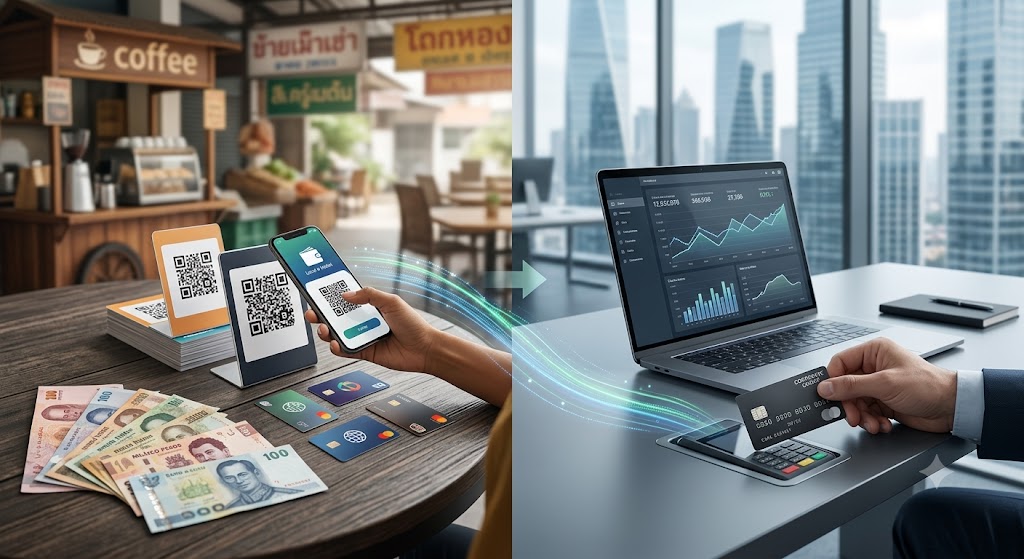
Local payment methods, however, are region-specific. Examples include UPI in India, iDEAL in the Netherlands, and Pix in Brazil.

Many customers outside the United States rarely use credit cards. Instead, they prefer bank transfers, mobile wallets, or cash-based systems.

Therefore, relying only on global gateways can limit your reach significantly. Some customers simply cannot complete checkout without local options.

Meanwhile, global gateways offer simplicity and broad coverage. One integration often works across dozens of countries at once.

Local Payment Methods vs Global Gateways: A Practical Guide

Why Local Payment Methods Matter for Conversion

Conversion rates depend heavily on payment familiarity. Customers trust payment methods they already use daily.

For instance, a shopper in Germany may abandon checkout without seeing SEPA transfer options. Similarly, Indonesian customers often expect e-wallet choices like GoPay.

As a result, ignoring local preferences can hurt sales directly. Studies consistently show higher cart abandonment when preferred methods are missing.

Additionally, local payment methods often reduce fraud risk. Bank-linked transfers require stronger identity verification than typical card payments.

Local methods also tend to settle faster in some regions. This improves cash flow for growing businesses significantly.

The Case for Global Gateways

Global gateways remain valuable for several reasons. They simplify technical integration across multiple markets.

Instead of connecting to dozens of local providers, you manage one system. This saves engineering time and reduces long-term maintenance work.

Global gateways also provide strong fraud protection tools. Their scale allows for advanced machine learning fraud detection.

Furthermore, they support recurring billing and subscription models smoothly. This matters greatly for SaaS companies and subscription services.

However, transaction fees can be higher with global providers. Currency conversion costs also add up for cross-border sales.

Local Payment Methods vs Global Gateways: Cost Comparison

Cost is a major factor in this decision. Global gateways typically charge a flat percentage per transaction.

Local payment methods often have lower fees within their home country. Bank transfers, for example, cost less than card processing.

Nevertheless, integrating many local methods can raise development costs upfront. You may need local partnerships or region-specific compliance work.

Consequently, businesses must weigh short-term integration costs against long-term savings. High transaction volume often justifies the initial investment.

Smaller businesses might start with a global gateway first. Then, they can add local options as specific markets grow.

How to Decide: Local Payment Methods vs Global Gateways

Start by analyzing your customer base carefully. Identify which countries generate the most traffic and revenue.

Next, research the dominant payment methods in those regions. Payment preference reports and industry data can guide this research.

Prioritize Local Options When

Your business targets specific high-growth markets. Local trust and conversion matter more than technical simplicity here.

Also prioritize local methods when card usage is low. Many Southeast Asian and Latin American markets fit this pattern.

Prioritize Global Gateways When

You need fast market entry across many countries at once. Simplicity and speed outweigh deep localization needs early on.

Global gateways also work well for subscription-based businesses. Recurring billing features save significant development time.

Consider a Hybrid Approach

Most successful global businesses use both options together. They start with a global gateway for broad coverage.

Then, they add popular local payment methods in key markets. This hybrid strategy balances simplicity with strong local conversion.

Payment orchestration platforms can help manage this hybrid setup. They route transactions intelligently between multiple providers automatically.

Regional Payment Preferences Worth Knowing

Different regions show very different payment habits. Understanding these patterns helps you prioritize correctly for each market.

Europe

European customers often prefer bank-based payments. iDEAL in the Netherlands and SEPA transfers across the region remain highly popular.

Additionally, Klarna and other buy-now-pay-later options continue growing quickly. These local preferences directly affect conversion rates.

Asia-Pacific

Mobile wallets dominate much of Asia-Pacific. Alipay and WeChat Pay lead in China, while GrabPay is common across Southeast Asia.

Meanwhile, UPI has become the standard in India for everyday transactions. Ignoring these options often means losing significant market share.

Latin America

Cash-based vouchers and installment payments remain popular across Latin America. Boleto in Brazil and OXXO in Mexico are common examples.

Pix has also grown rapidly as an instant payment method in Brazil. Businesses entering this region should prioritize these local options early.

Measuring the Impact of Payment Choices

Once you implement changes, track results carefully. Compare conversion rates before and after adding local payment methods.

Also monitor cart abandonment rates by country. A sudden drop after adding a local option confirms its value quickly.

Additionally, review customer support tickets related to payment issues. Fewer complaints often signal a smoother checkout experience.

Over time, this data helps refine your local payment methods vs global gateways strategy. You can double down on what works and remove what does not.

Conclusion

The local payment methods vs global gateways debate rarely has one universal answer. Your ideal strategy depends on your target markets and growth stage.

Global gateways offer speed, simplicity, and strong subscription support. Local payment methods build trust and boost conversion in specific regions.

Therefore, most growing businesses benefit from a hybrid approach eventually. Start broad, then localize where the data shows real demand.

Track conversion rates and abandonment closely after any change. This data will guide your next payment strategy decision effectively.

Working With Payment Providers Effectively

Building strong relationships with payment providers pays off long term. Ask providers directly about their local coverage and settlement times.

Additionally, negotiate transaction fees as your volume grows. Many providers offer better rates for higher processing volumes.

Request clear reporting dashboards from every provider you use. This makes it easier to compare performance across regions.

Also review provider uptime and reliability history. Payment failures during high traffic periods can cost significant revenue quickly.

Finally, revisit your provider mix annually. Markets change, and new local payment methods emerge regularly.

Future Trends in Global Payments

Payment preferences continue evolving rapidly worldwide. Real-time payment networks are expanding across more countries each year.

Meanwhile, regulatory changes continue shaping how businesses handle cross-border transactions. Staying informed helps you adapt quickly.

Digital wallets are also gaining ground even in previously card-dominant markets. This trend suggests local preferences will keep diversifying further.

Businesses that monitor these shifts closely will maintain a competitive edge. Flexibility remains essential in the payments landscape.

Security and Trust Signals at Checkout

Trust badges and recognizable payment logos improve customer confidence. Display these clearly near the checkout button.

Additionally, communicate your data protection practices briefly during checkout. This reassurance can reduce last-minute hesitation for new customers.

Handling Currency and Localization Details

Beyond payment methods, currency display matters greatly. Show prices in local currency whenever possible to reduce confusion.

Additionally, localize checkout language and support messaging. Small details like these build trust alongside the right payment options.

Consider local tax and invoicing requirements as well. Some markets expect specific receipt formats for business compliance.

Building a Checklist Before Launch

Before launching in a new market, create a simple checklist. List the top three payment methods customers expect locally.

Verify settlement currencies and timelines with each provider in advance. Confirm that refund and dispute processes work smoothly too.

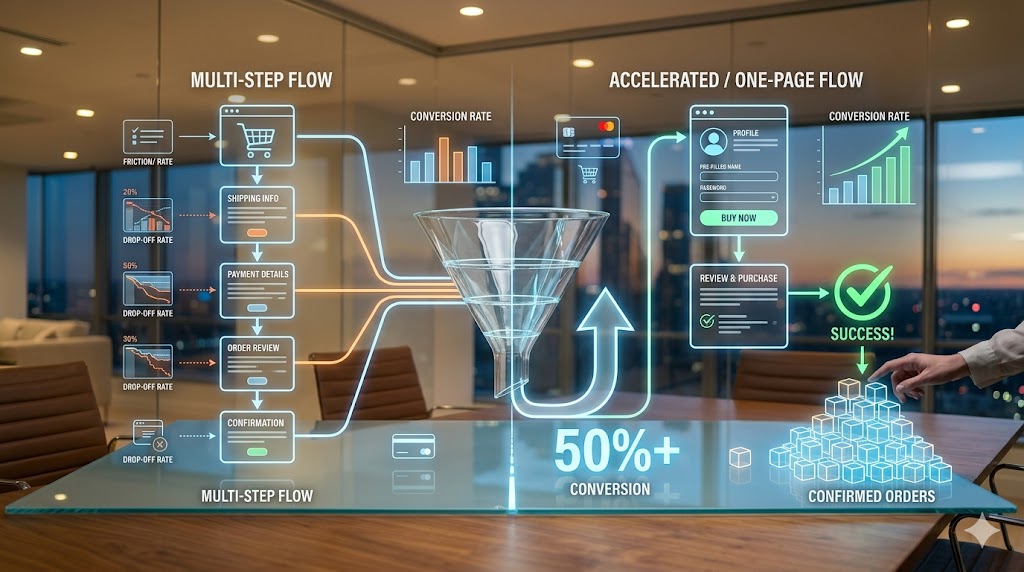
Test the checkout flow thoroughly on both mobile and desktop devices. A smooth, fast checkout experience often matters as much as payment choice itself.

Frequently Asked Questions

1. What is the main difference between local payment methods and global gateways? 

Local payment methods are region-specific options like bank transfers or e-wallets. Global gateways are broad platforms that support cards across many countries.

2. Do local payment methods really improve conversion rates? 

Yes, customers convert more often when they see familiar payment options. Missing local methods frequently leads to cart abandonment.

3. Are global gateways more expensive than local payment methods? 

Often, yes. Global gateways typically charge higher transaction fees, especially for cross-border and currency conversion transactions.

4. Should small businesses use global gateways or local payment methods first? 

Most small businesses start with a global gateway for simplicity. They add local payment methods once specific markets show strong demand.

5. Can a business use local payment methods and global gateways together? 

Yes, a hybrid approach is common and often recommended. It combines broad reach with strong local market conversion.

Read More:

Payment Localization: A Simple Breakdown for Stores

Trust Signals and Payment Completion: A Simple Guide

How to Stop Payment Latency From Hurting Revenue

Payment Localization

Payment Localization: A Simple Breakdown for Stores

Global shoppers expect a checkout that feels familiar. When it does not, many simply leave. Checkout localization solves this problem by adapting payment experiences to match local habits and expectations.

This approach goes beyond translating text on a page. It includes currency, payment methods, and even design choices. As a result, shoppers feel more comfortable completing their purchase.

This guide explains checkout localization in clear, simple terms. You will learn why it matters and how to apply it across different regions. No technical background is required.

As more brands sell across borders, this topic keeps growing in importance. A single checkout page can now serve customers in dozens of countries. Getting that page right for each visitor is no longer optional.

What Is Checkout Localization?

Checkout localization means adjusting the payment process based on a customer’s location. This includes currency display, language, and accepted payment methods. The goal is to make checkout feel natural for each shopper.

For example, a customer in Germany might expect to pay with a bank transfer method. A shopper in the United States, however, often prefers a credit card. Checkout localization adapts to these regional preferences automatically.

This differs from a basic global checkout. A basic system often uses one payment method for every customer. Checkout localization instead detects location and adjusts the experience accordingly.

Furthermore, localization can include formatting details. Date formats, address fields, and tax calculations often vary by country. Handling these correctly builds trust and avoids confusing the shopper.

Checkout localization also extends to legal disclosures. Some regions require specific consumer protection notices at checkout. Including these in the correct language and format keeps a business compliant.

Shipping options often need adjustment too. Local carriers and delivery timelines vary widely between countries. Presenting accurate, region-specific shipping choices avoids confusion at the final purchase step.

Payment Localization

Why Geography Affects Payment Preferences

Payment habits differ widely around the world. In some countries, digital wallets dominate online shopping. In others, cash-based vouchers or bank transfers remain popular choices.

For instance, many Southeast Asian shoppers prefer e-wallets for online payments. Meanwhile, customers in parts of Europe often rely on direct bank transfer systems. Ignoring these preferences can lead to lost sales.

Trust also plays a major role. Shoppers feel safer using payment methods they already know. If a checkout only offers unfamiliar options, many customers will abandon their cart.

Currency display matters too. Seeing prices in local currency removes confusing conversion math. This small detail can significantly improve buyer confidence during checkout.

In addition, regulations vary by region. Some countries require specific security steps for online payments. Checkout localization helps businesses stay compliant while keeping the experience smooth.

Banking infrastructure also shapes payment habits. In regions with strong mobile banking systems, app-based transfers often outperform traditional cards. Recognizing these differences helps merchants choose the right options for each market.

Cultural attitudes toward credit also vary. Some markets embrace credit cards and installment plans. Others prefer to pay in full using debit or cash-based methods. Checkout localization respects these cultural differences instead of forcing one approach everywhere.

How Checkout Localization Reduces Cart Abandonment

Cart abandonment remains a major challenge for online stores. Many shoppers leave during checkout simply because the process feels unfamiliar. Checkout localization directly addresses this issue.

When customers see their preferred payment method, they feel more confident. This confidence often leads to completed purchases instead of abandoned carts. As a result, conversion rates tend to improve significantly.

Language also plays an important role here. Even small translation errors can create doubt. A fully localized checkout removes this friction and builds a smoother experience.

Similarly, displaying local tax and shipping costs upfront helps. Surprise charges at the final step often cause shoppers to leave. Clear, localized pricing prevents this common frustration.

Mobile shoppers benefit especially from localization. Many regions rely heavily on mobile payment apps. Supporting these options can dramatically increase completed transactions.

Trust signals also matter during checkout. Displaying recognizable security badges or familiar payment logos reassures shoppers. This is especially true for first-time buyers who are unfamiliar with a brand.

Speed plays a role too. A checkout that loads quickly and adapts instantly to a shopper’s region feels more professional. Slow or generic checkout pages, by contrast, often raise doubts about reliability.

Key Elements of a Localized Payment Experience

Several elements work together to create strong checkout localization. Payment method selection is often the most important piece. Offering popular regional options increases the chance of a successful sale.

Currency conversion is another key factor. Accurate, real-time currency display avoids confusion and builds trust. Static or outdated currency rates can frustrate shoppers and damage credibility.

Language adaptation matters as well. This includes not only translation but also tone and phrasing. Some markets prefer formal language, while others respond better to casual wording.

Design elements also need adjustment. Color meanings and visual symbols can vary across cultures. A thoughtful design avoids unintentional confusion or discomfort during checkout.

Finally, customer support options should match local expectations. Some regions prefer live chat, while others rely on phone support. Providing the right support channel adds another layer of trust.

Form fields deserve attention too. Address formats differ widely between countries, and rigid forms can frustrate international shoppers. Flexible fields that adjust to local formats reduce errors and speed up checkout.

Error messages also benefit from localization. Clear, well-translated error messages help shoppers fix mistakes quickly. Confusing or poorly translated messages, on the other hand, often lead to abandoned purchases.

Common Challenges in Checkout Localization

Implementing checkout localization is not without challenges. Integrating multiple payment providers can be technically complex. Each region often requires different systems and compliance steps.

Maintaining consistency is another concern. Businesses must balance localization with a unified brand experience. Too much variation across regions can confuse internal teams and customers alike.

Cost is also a factor worth considering. Supporting many payment methods may increase transaction fees. However, the increase in completed sales often outweighs these added costs.

Keeping up with changing regulations adds further complexity. Payment laws evolve frequently, especially in fast-growing digital markets. Businesses must monitor these changes to remain compliant.

Despite these challenges, the long-term benefits usually justify the effort. Companies that invest in proper localization often see stronger customer loyalty and higher conversion rates over time.

Team coordination can also be tricky. Marketing, legal, and technical teams must work together to keep localization accurate. Without clear communication, mismatched pricing or outdated payment options can slip through.

Testing across regions takes ongoing effort as well. Payment providers occasionally update their requirements or interfaces. Regular reviews help ensure the checkout experience stays accurate and reliable.

Staff training is sometimes overlooked too. Customer service teams need to understand regional payment differences when shoppers reach out with questions. Well-trained support staff can resolve issues quickly and keep trust intact.

How to Start Implementing Checkout Localization

Starting checkout localization does not require a complete system rebuild. Begin by researching the most common payment methods in your target markets. This research forms the foundation of your strategy.

Next, choose a payment platform that supports multiple regional options. Many providers now offer built-in localization features. This can significantly reduce development time and cost.

After that, test the checkout experience from each target region. Pay attention to currency display, language accuracy, and payment method availability. Small errors can have a big impact on customer trust.

Gathering customer feedback is also valuable during this stage. Shoppers often notice details that internal teams might overlook. Their input can guide further improvements to the checkout flow.

Finally, monitor performance metrics closely after launch. Track conversion rates and cart abandonment by region. This data will help refine your checkout localization strategy over time.

It also helps to prioritize markets by sales potential first. Focusing early effort on your top regions delivers faster returns. Once those markets are running smoothly, expanding to additional countries becomes much easier to manage.

Conclusion

Checkout localization plays a vital role in global ecommerce success. Adapting payment experiences by geography builds trust and reduces friction. These improvements often lead directly to higher conversion rates.

Businesses that ignore regional payment preferences risk losing valuable customers. Meanwhile, those who invest in localization create smoother, more trustworthy shopping experiences. This investment pays off through stronger sales and loyalty.

As global ecommerce continues to grow, checkout localization will become even more essential. Companies that prioritize this strategy now position themselves for long-term success in international markets.

Start with your highest-priority markets and expand from there. Careful planning, regular testing, and attention to local detail will help any business build a checkout experience that customers everywhere can trust.

Frequently Asked Questions

  1. What is checkout localization?
    Checkout localization is the process of adapting payment methods, currency, and language to match a customer’s geographic location and preferences.
  2. Why does checkout localization reduce cart abandonment?
    It builds trust by offering familiar payment options and clear local pricing, which makes shoppers more confident about completing their purchase.
  3. What payment methods should be localized?
    Common options include credit cards, digital wallets, bank transfers, and region-specific payment apps based on local shopper preferences.
  4. Is checkout localization expensive to implement?
    Costs vary, but many payment platforms now offer built-in localization tools that reduce both development time and overall expense.
  5. How can businesses start with checkout localization?
    Begin by researching regional payment preferences, choosing a supportive platform, testing thoroughly, and monitoring performance after launch.

Read More:

Trust Signals and Payment Completion: A Simple Guide

How to Stop Payment Latency From Hurting Revenue

Conversion Rate Secrets Hidden in Payment Methods

Trust Signals and Payment Completion: A Simple Guide

Trust Signals and Payment Completion: A Simple Guide

Online shoppers hesitate more than business owners realize. A single moment of doubt at checkout can cost a sale. This is exactly where trust signals make a difference.

Trust signals are small cues that tell shoppers a website is safe. They include security badges, reviews, and clear payment icons. Together, these cues directly influence payment completion rates.

Many online stores lose customers right before the final click. Shoppers fill their carts, then suddenly leave. Often, the missing piece is trust, not price or product quality.

Picture a shopper reaching checkout on an unfamiliar site. They like the product, but something feels uncertain. A missing badge or vague payment process can end the purchase instantly.

This guide explains why trust signals matter so much during checkout. You will learn which signals work best and how to use them. By the end, you will understand how to turn hesitant visitors into paying customers.

Trust Signals and Payment Completion: A Simple Guide

What Are Trust Signals and Why Do They Matter

Trust signals are visual or written cues that build buyer confidence. They reassure shoppers that a website is legitimate and secure. Common examples include SSL badges, customer reviews, and recognizable payment logos.

Shoppers rarely read every word on a checkout page. Instead, they scan quickly for signs of safety. A missing security badge or unclear payment method can trigger doubt instantly.

This doubt often leads to cart abandonment. Studies consistently show that unclear security is a top reason shoppers leave. Trust signals reduce this risk by addressing concerns before they grow.

Payment completion rates depend heavily on perceived safety. Shoppers want to know their card details are protected. A simple lock icon near the payment field can ease that worry significantly.

Trust signals also work psychologically. People naturally look for proof before committing to a decision. Online shopping is no different from offline trust-building in this sense.

A handshake or familiar storefront once reassured customers in person. Today, trust signals serve that same purpose online. They replace the missing physical reassurance shoppers used to rely on.

This matters even more for first-time visitors. Returning customers already trust your brand from past experience. New visitors, however, judge everything within seconds of arriving.

Trust signals work differently across industries too. A jewelry store may need stronger security messaging than a stationery shop. Higher-priced items naturally trigger more caution from shoppers.

Age and shopping habits also play a role. Some shoppers check for security badges automatically out of habit. Others simply feel uneasy without knowing exactly why, until something reassures them.

How Trust Signals Influence Payment Completion Rates

Payment completion rates measure how many shoppers finish their purchase. Trust signals directly affect this number at nearly every stage. Even small design choices can shift completion rates noticeably.

Displaying secure checkout badges near payment fields, for example, reduces hesitation. Shoppers feel reassured when they see recognizable security symbols. This small detail often leads to fewer abandoned carts.

Customer reviews also act as powerful trust signals. Seeing other buyers’ positive experiences reduces uncertainty. New customers feel more comfortable completing their purchase as a result.

A single detailed review can outweigh pages of marketing copy. Shoppers trust peer experiences over brand claims. Genuine feedback carries weight that polished sales language cannot match.

Clear return policies serve a similar purpose. Shoppers want to know they can get a refund if needed. This safety net often pushes hesitant buyers toward completing payment.

Trust badges from recognized payment providers matter too. Logos like Visa, Mastercard, or PayPal signal legitimacy instantly. Shoppers trust these brands, and that trust transfers to your store.

Site design plays a role as well. A professional, clean checkout page feels safer than a cluttered one. Visual consistency throughout the buying journey reinforces trust at every step.

Mobile shoppers are especially sensitive to trust signals. Smaller screens leave less room for error or confusion. Clear, simple trust cues become even more important on mobile devices.

Page load speed influences trust too, though it is often overlooked. Slow checkout pages feel unreliable, even when security is solid. Fast, smooth performance quietly reinforces every other trust signal on the page.

Checkout length matters in a similar way. Long forms with unnecessary fields create friction and doubt. Shorter, well-organized checkout flows feel safer and more trustworthy overall.

Types of Trust Signals That Improve Checkout Conversions

Several types of trust signals work together to improve payment completion. Understanding each type helps you apply them effectively. Let us look at the most impactful ones.

Security badges are among the most recognized trust signals. SSL certificates and secure checkout icons reassure shoppers instantly. These badges should appear near payment fields, not buried in footers.

Customer reviews and testimonials build social proof. Shoppers trust other buyers more than marketing copy. Displaying reviews near product pages and checkout pages strengthens buyer confidence.

Video testimonials can add even more weight than written ones. Seeing a real customer speak feels more authentic. This extra layer of credibility can ease last-minute checkout doubts.

Transparent pricing is another important trust signal. Hidden fees that appear at checkout frustrate shoppers instantly. Clear, upfront pricing prevents last-minute surprises that cause cart abandonment.

Recognizable payment logos also matter greatly. Shoppers feel safer paying through familiar platforms. Offering multiple trusted payment options increases the likelihood of completed purchases.

Contact information builds trust as well. A visible phone number or live chat option reassures shoppers. It signals that real people stand behind the business.

Trust seals from third-party security companies add another layer. Norton, McAfee, and similar seals are widely recognized. Shoppers associate these seals with safety, even without understanding the technical details.

Clear refund and shipping policies round out the list. Shoppers want predictability before paying. Transparent policies reduce anxiety and support higher payment completion rates.

Finally, consider adding trust signals tied to your industry specifically. Healthcare sites benefit from privacy certifications, while finance sites benefit from regulatory disclosures. Matching signals to industry expectations builds even stronger credibility.

Social media presence can function as a trust signal too. An active, responsive account shows shoppers that a real business stands behind the storefront. Silence or inactivity, in contrast, can quietly raise doubts.

Best Practices for Using Trust Signals Effectively

Adding trust signals randomly rarely produces strong results. Strategic placement and consistent messaging matter more than quantity. Businesses should follow a few key best practices, therefore, before adding anything new.

Place trust signals near the payment button itself first. This is where hesitation peaks. Security badges placed here reduce last-minute doubts effectively.

Avoid overcrowding the page with too many badges. Too many logos can look unprofessional or even suspicious. A few well-placed, recognizable signals work better than dozens of small icons.

Update trust signals regularly to maintain credibility. Outdated certificates or broken badge links damage trust instantly. Regular audits ensure all signals remain accurate and functional.

Highlight genuine customer reviews whenever possible. Fake or exaggerated testimonials can backfire if shoppers sense inauthenticity. Authentic feedback builds stronger, longer-lasting trust.

Test different placements and combinations of trust signals. A/B testing reveals what resonates most with your specific audience. Data-driven adjustments often improve payment completion rates significantly.

Small changes can produce surprisingly large results. Moving a badge a few inches, or rewording a guarantee, can shift behavior. Testing removes guesswork from these decisions entirely.

Gathering shopper feedback directly can also help. A short survey asking why someone abandoned a cart often reveals trust gaps. This direct insight is sometimes more valuable than any analytics dashboard.

Mobile optimization deserves special attention as well. Trust signals must remain visible and clear on smaller screens. A cluttered mobile checkout page undermines even the strongest trust signals.

Consistency across your website strengthens overall credibility. Mismatched branding or inconsistent messaging creates subtle doubt. A cohesive experience reassures shoppers at every step of their journey.

Conclusion

Trust signals play a critical role in payment completion rates. From security badges to customer reviews, these small cues reduce hesitation and build confidence. Businesses that prioritize trust signals often see meaningful improvements in checkout conversions.

Implementing trust signals does not require a complete website overhaul. Small, strategic changes can produce noticeable results quickly. As online shopping continues to grow, trust signals will remain essential for converting visitors into loyal customers.

Start by reviewing your own checkout page with fresh eyes. Notice where you, as a shopper, might hesitate. That small exercise often reveals exactly where trust signals are needed most.

Trust is earned in seconds and lost just as quickly online. A thoughtful approach to trust signals protects every sale you have worked hard to earn.

Treat trust signals as an ongoing part of your store, not a one-time task. Markets change, and shopper expectations shift along with them. Regular attention keeps your checkout experience credible for years to come.

Frequently Asked Questions

  1. What are trust signals in online payments?
    Trust signals are visual or written cues, such as security badges and reviews, that reassure shoppers during checkout.
  2. How do trust signals improve payment completion rates?
    Trust signals reduce shopper hesitation by addressing security and legitimacy concerns before checkout is completed.
  3. Where should trust signals be placed on a website?
    Trust signals work best near payment fields, checkout buttons, and product pages where hesitation typically occurs.
  4. Can too many trust signals hurt conversions?
    Yes. Overcrowding a page with badges can appear unprofessional and reduce, rather than build, buyer confidence.
  5. Are customer reviews considered trust signals?
    Yes. Customer reviews act as social proof and are one of the most effective trust signals available.

Read More:

How to Stop Payment Latency From Hurting Revenue

Conversion Rate Secrets Hidden in Payment Methods

Which Checkout Type Converts Better for Online Stores

Payment UX Audit Checklist for Better Results

Payment UX Audit Checklist for Better Results

Customers leave checkout pages more often than most businesses realize. A poor payment experience is one of the top reasons for lost sales. Complicated or confusing checkout flows drive users away at the final step. A payment UX audit helps you find and fix these problems before they cost you more revenue. This step-by-step framework gives businesses a clear method to review, analyze, and improve their payment user experience. Whether you run an ecommerce store, a subscription service, or a SaaS platform, this guide applies to your checkout process.

What Is a Payment UX Audit and Why It Matters

A payment UX audit is a structured review of your entire checkout and payment flow. It examines every step a customer takes from adding an item to cart through to payment confirmation. The goal is to identify friction points, design flaws, and technical issues that cause users to abandon the process.

Cart abandonment rates average nearly seventy percent globally. A large portion of those abandonments happen at the payment stage specifically. Therefore, improving payment UX directly increases completed transactions and revenue.

Payment UX Audit Checklist for Better Results

Signs Your Payment UX Needs an Audit

High cart abandonment rates are the most obvious signal. If users regularly drop off at the payment page, something is wrong with the experience.

Other signs include low conversion rates on specific payment methods, a spike in customer support contacts about checkout issues, or negative feedback mentioning confusion at checkout. If your payment flow has not been reviewed in over a year, it is already overdue.

Step One – Map Your Entire Payment Journey

The first step in any payment UX audit is mapping every touchpoint in your checkout process. Start from the moment a user clicks the checkout button and document every screen, form, and decision point until the confirmation page.

This map becomes your audit foundation. Use it to identify how many steps your process includes and count the number of form fields on each page. Note where users must create accounts or log in. Each extra step is a potential drop-off point.

Tools for Mapping the Payment Journey

Session recording tools like Hotjar or Microsoft Clarity let you watch real users move through your checkout. These recordings reveal exactly where people pause, click repeatedly, or leave. Google Analytics funnel reports show you where the biggest drop-offs occur numerically.

Additionally, heatmaps show which areas of your payment page receive the most attention. If users are clicking on non-clickable elements near your payment form, that is a design confusion signal worth investigating.

Step Two – Evaluate Form Design and Field Requirements

Payment forms are often the biggest source of UX friction. Review every field carefully. Ask whether each one is truly necessary. Reducing form fields consistently improves completion rates.

Common issues include asking for information that can be auto-filled, using unclear field labels, and grouping unrelated fields awkwardly. Moreover, inline validation, where the form alerts users to errors as they type, dramatically reduces submission failures.

Best Practices for Payment Form Design

Labels should sit above input fields, not inside them. Placeholder text inside fields disappears when a user starts typing, causing confusion. Use clear, simple language for every label. Write “Card number” rather than “PAN” or “Account digits.”

Error messages must be specific. Instead of “Invalid input,” write “Please enter a valid 16-digit card number.” This guides users to fix the problem quickly. Furthermore, auto-formatting features, like adding spaces after every four card digits, reduce errors significantly.

Group related fields logically. Billing address fields should be together, and card details grouped separately. This visual organization reduces cognitive load. As a result, users move through the form more confidently.

Step Three – Review Trust Signals and Security Indicators

Trust is critical during payment. Users are sharing sensitive financial information. If they do not feel secure, they will abandon the process. A payment UX audit must evaluate every trust signal on your checkout pages.

Common trust signals include SSL certificate indicators, security badges from recognized providers, accepted payment method logos, and clear refund or privacy policies. Showing real customer reviews near checkout can also reduce hesitation.

What Trust Elements to Check During Your Audit

Check whether your checkout page uses HTTPS throughout. Any switch to non-secure pages immediately triggers user suspicion. Verify that security badges are visible without scrolling, particularly on mobile devices.

Review your payment method icons. Showing familiar logos such as Visa, Mastercard, and PayPal reassures users. Similarly, display a short, clear return policy near the payment button to reduce purchase anxiety.

Test all pages on mobile devices specifically. Trust elements that are visible on desktop often become hidden or misaligned on smaller screens. A dedicated mobile review is therefore essential during this audit step.

Step Four – Test Payment Speed and Technical Performance

Slow payment pages lose customers. Even a one-second delay in page load time can reduce conversions meaningfully. Your payment UX audit must therefore include a technical performance review.

Use tools like Google PageSpeed Insights or GTmetrix to measure load times on your checkout pages. Pay particular attention to mobile performance, since a growing majority of transactions happen on smartphones. Target a load time under three seconds for each payment page.

Common Technical Issues That Hurt Payment UX

Session timeouts during checkout are a significant frustration. If a user spends time reviewing their order and then finds their session expired, they are unlikely to start over. Extend session times on checkout pages or save cart data automatically.

Payment gateway errors should be handled gracefully. When a card is declined, display a clear, calm message and offer alternative payment methods immediately. Do not show technical error codes that confuse users. Moreover, test your checkout regularly across different browsers and devices to catch issues before customers encounter them.

Step Five – Analyze and Prioritize Your Audit Findings

Once you have completed your review, compile all findings in one place. Group them by severity: critical issues that actively prevent payment, moderate issues that create friction, and minor issues that reduce polish.

Address critical issues first. These are bugs, broken payment methods, or missing trust signals. Moderate friction points come next. This prioritization ensures your effort creates the greatest impact quickly.

Frequently Asked Questions

1: How often should a business run a payment UX audit?
A full payment UX audit should be conducted at least once per year. Also run a partial audit whenever you make significant changes to your checkout flow, switch payment providers, or notice a drop in conversion rates.

2: What is the most common payment UX mistake?
Requiring account creation before purchase is one of the most damaging mistakes. Many users abandon checkout rather than create an account. Always offer a guest checkout option as a primary path.

3: Can a payment UX audit reduce cart abandonment?
Yes, significantly. Identifying and fixing friction points in your checkout directly reduces abandonment rates. Even small improvements like reducing form fields or adding trust badges can produce measurable gains.

4: Do I need a developer to run a payment UX audit?
Not for the analysis phase. Tools like Hotjar, Google Analytics, and PageSpeed Insights are accessible without technical skills. However, fixing technical issues found during the audit will typically require developer support.

5: How long does a payment UX audit take?
A thorough audit typically takes between one and three weeks depending on the complexity of your checkout flow. Implementing fixes can take additional time based on issue severity.

Conclusion

A payment UX audit is one of the highest-return investments a business can make. Every improvement to your checkout experience directly impacts revenue. By mapping your payment journey, refining form design, strengthening trust signals, and addressing technical performance, you create a checkout flow that customers trust and complete. Start with your highest drop-off points and work through each step in this framework. Consequently, you will see real improvements in your conversion rate, your revenue, and your customer satisfaction.

Read More:

Why Psychology of Payments Changes Conversions: Full Guide

Headless Commerce Payments Best Practices: Complete Guide

Fintech Relies on Microservices-Based Infrastructure Now

Why Psychology of Payments Changes Conversions: Full Guide

Why Psychology of Payments Changes Conversions: Full Guide

You have a great product. Your marketing works. Visitors land on your site, add items to their cart — then vanish. Sound familiar? Cart abandonment is one of the biggest problems in e-commerce. The average abandonment rate sits around 70%. That means seven out of ten shoppers leave without buying. Understanding the psychology of payments helps you fix this. When you know why people hesitate, you can remove the friction that stops them from completing a purchase.

The Pain of Paying: Why Spending Hurts

Neuroscience shows that spending money activates the same brain regions associated with physical pain. Researchers call this the ‘pain of paying.’

This pain is strongest when payment feels direct and visible. Handing over cash hurts more than swiping a card. Seeing a total before clicking ‘Pay’ triggers more hesitation.

Therefore, smart checkout design reduces this psychological pain. The goal is to make payment feel effortless and natural — not stressful.

Why Psychology of Payments Changes Conversions: Full Guide

Key Reasons Users Drop Off at Checkout

1. Unexpected Costs

Surprise fees are the number one reason users abandon carts. Shipping charges, taxes, or handling fees that appear late in the process feel like a betrayal.

Customers set a mental budget early. When the final total exceeds that number, they feel tricked. Consequently, they leave — often never to return.

The fix is simple: show all costs upfront. Display estimated shipping and taxes on the product page. Transparency builds trust.

2. Forced Account Creation

Asking users to create an account before buying creates massive friction. Many users simply do not want to share their email or remember another password.

Research by Baymard Institute found that 24% of users abandon checkout because of forced registration. Always offer a guest checkout option.

Additionally, let users sign up after purchase. Once they have a positive experience, they are far more likely to create an account willingly.

3. Complex or Long Checkout Forms

Every extra field you add is a chance for users to give up. Long forms feel like work. They kill momentum and trigger second thoughts.

Use autofill wherever possible. Ask only for essential information. Split long forms into clear steps with progress indicators so users know where they are.

4. Security Concerns

Users worry about their financial data. A checkout page that looks outdated, lacks HTTPS, or shows unfamiliar payment logos raises red flags.

Display trust signals clearly. Use SSL certificates. Show recognised payment icons — Visa, Mastercard, PayPal. Add security badges from brands like Norton or McAfee.

Furthermore, explain how you protect customer data. A short, reassuring line near the payment field reduces anxiety significantly.

5. Slow Page Load Times

A checkout page that loads slowly destroys conversions. Google data shows that even a one-second delay reduces conversions by up to 7%.

Optimise your checkout page speed aggressively. Compress images. Use a fast hosting provider. Minimise scripts. Every millisecond counts at the payment stage.

6. Limited Payment Options

Today’s shoppers expect choice. Some prefer credit cards. Others want PayPal, Apple Pay, Google Pay, or Buy Now Pay Later options.

Offering only one or two payments methods alienates large groups of potential buyers. Expand your payment options to match your audience’s preferences.

The Role of Trust in Payment Decisions

Trust is the currency of checkout. Without it, even interested buyers will not complete a purchase. Social proof is a powerful trust builder. Display real customer reviews near the checkout.

Show how many people have bought the same product. Use testimonials from verified buyers. Moreover, money-back guarantees reduce the perceived risk of buying. When users know they can get a refund, the decision feels safer. Remove risk, and you remove hesitation.

Cognitive Load and Decision Fatigue

By the time a user reaches checkout, they have already made many decisions. They chose a product, picked a size, selected a colour. Each choice uses mental energy.

Decision fatigue sets in. At the payments stage, users are mentally tired. Any extra choice — promo code boxes, upsell popups, or confusing layout — can push them over the edge.

Simplify your checkout ruthlessly. Remove distractions. Eliminate unnecessary steps. Make the path to purchase as clear and short as possible.

The Power of Progress Indicators

People are more likely to complete a task when they can see progress. This is called the Zeigarnik Effect — unfinished tasks stay in our minds until complete.

Use a clear step indicator in your checkout. Show users exactly where they are — Step 1 of 3, for example. This reduces anxiety and increases completion rates.

Additionally, save progress automatically. If a user leaves and returns, their cart and form data should still be there. This reduces re-entry friction significantly.

Abandoned Cart Recovery Strategies

Even with a perfect checkout, some users will leave. Recovery strategies bring them back. Send abandoned cart emails within one hour of drop-off. Studies show these emails recover around 5-10% of abandoned carts. Keep the email short, friendly, and include a direct link back to the cart.

Use retargeting ads to remind users of what they left behind. Personalised ads with the exact product they viewed perform significantly better than generic promotions.

Furthermore, consider exit-intent popups. When a user moves their mouse toward the browser’s close button, trigger a popup with a small incentive — free shipping or a discount code.

Optimising Mobile Checkout

More than 60% of online shopping now happens on mobile devices. Yet mobile conversion rates lag behind desktop by a wide margin.

Mobile checkout must be frictionless. Use large, tappable buttons. Auto-detect card details using the camera. Enable one-click payments options like Apple Pay or Google Pay.

Test your checkout flow on multiple devices regularly. What works on desktop often breaks on mobile. Fix every point of friction you find.

Key Takeaways

The psychology of payments reveals that checkout drop-off is rarely about the product. It is about friction, fear, and lost trust.

Remove surprise costs. Simplify your forms. Build trust signals. Offer multiple payment methods. And keep your checkout fast, clean, and focused.

When you understand what users feel at checkout, you can design a process that feels effortless. Fewer drop-offs mean more revenue. Start optimising your checkout today.

Read More:

Headless Commerce Payments Best Practices: Complete Guide

Fintech Relies on Microservices-Based Infrastructure Now

Event-Driven Payment System: What You Need Full Guide

Headless Commerce Payments Best Practices: Complete Guide

Headless Commerce Payments Best Practices: Complete Guide

Shopping has changed. Customers buy on websites, apps, smart TVs, voice assistants, and even in-store kiosks. Traditional ecommerce platforms struggle to keep up. Headless commerce solves this problem. It separates the front end from the back end, giving brands the freedom to build any experience they want.

When you add headless payments to the mix, checkout becomes just as flexible as the rest of the store. The result is a faster, smoother, more customizable buying journey.

What Is Headless Commerce?

Traditional ecommerce platforms bundle everything together. The storefront, the cart, the checkout, and the back-end logic all live in one system. Changing one part often breaks another.

Headless commerce breaks this bundle apart. The front end, what customers see, connects to the back end through APIs. Developers can build any front-end experience without touching the commerce engine underneath.

Therefore, brands gain creative freedom. They can design unique storefronts for every channel. They can update the look without disrupting business logic. This separation is the core of headless architecture.

Headless Commerce Payments Best Practices: Complete Guide

Why Payments Needed to Go Headless Too?

For years, checkout was the last thing brands customised. Payment forms were rigid. Styling was limited. Adding new payment methods took months of development work. This mattered because checkout is where buyers convert or abandon. A clunky payment experience kills sales. Even a one-second delay raises cart abandonment rates significantly.

Consequently, headless payments emerged as a natural extension of headless commerce. By decoupling the payment layer, brands control every pixel of the checkout experience. The also integrate new payment methods in days, not months.

How Headless Payments Work?

Headless payment solutions expose payment functionality through APIs. The brand builds its own checkout UI. The payment processor handles the sensitive data underneath.

Tokenisation keeps cardholder data secure. The front end never actually sees raw card numbers. Instead, it passes a token to the payment processor, which completes the transaction.

Additionally, webhooks notify the front end when a payment succeeds or fails. This allows real-time feedback without a page refresh. The result feels fast and modern to the customer.

Key Benefits of Decoupling Checkout

First, speed improves dramatically. Custom-built checkout pages load faster than bloated, all-in-one platform templates. Faster pages mean higher conversion rates.

Second, localisation becomes easy. Different markets want different payment methods. Brazil favours Boleto. Germany prefers SEPA. The Netherlands uses iDEAL. Headless architecture lets you plug in local methods for each region.

Third, A/B testing checkout flows becomes straightforward. You can test button colours, form layouts, and step sequences without touching the payment engine. Data drives optimisation.

Furthermore, brand consistency extends all the way through checkout. No more jarring redirects to generic payment pages. The customer stays in your branded environment from browse to buy.

Popular Headless Payment Providers

Stripe leads the field. Its Payment Intents API gives developers granular control over the payment flow. Stripe Elements provides pre-built, customisable UI components.

Adyen serves enterprise brands. It supports over 200 payment methods and provides deep reporting tools. Its Checkout API enables fully custom experiences. Braintree, owned by PayPal, focuses on flexibility and developer experience. It supports cards, PayPal, Venmo, and local payment methods through a single integration.

Moreover, newer players like Primer and Gr4vy act as payment orchestration layers. They sit above multiple payment processors, routing transactions to the best provider for each situation.

Composable Commerce: The Bigger Picture

Headless commerce and headless payments are part of a larger movement called composable commerce. Instead of one monolithic platform, composable commerce assembles best-of-breed solutions.

A brand might use Contentful for content management, Commerce tools for commerce logic, Stripe for payments, and Algolia for search. Each piece excels at its function. APIs connect them all.

This approach follows the MACH architecture principles: Microservices, API-first, Cloud-native, and Headless. MACH brands move faster, innovate more, and adapt to market changes without major re-platforming projects.

However, composable commerce also adds complexity. More vendors mean more integrations to maintain. Strong engineering teams and clear governance are therefore essential.

Challenges of Going Headless

Headless is powerful but not simple. Building a custom front end requires skilled developers. Maintaining API integrations demands ongoing effort. Costs can rise quickly without careful planning.

Security is another concern. More API connections create more potential attack surfaces. Each integration point needs proper authentication, encryption, and monitoring.

PCI DSS compliance also needs attention. Payment card industry standards govern how cardholder data is handled. Headless architectures must still meet these requirements, even when data never touches the front end directly.

Despite these challenges, the benefits typically outweigh the costs for brands at scale. Smaller brands may prefer managed headless solutions that reduce engineering overhead.

Conversion Optimisation Through Headless Checkout

One-page checkout reduces friction. Progressive disclosure only shows form fields when needed. Auto-fill speeds up the process for returning customers.

Buy Now Pay Later (BNPL) options like Klarna and Afterpay increase average order values. Adding them to headless checkout is a simple API call. The brand does not need to manage credit risk.

Express checkout options also matter greatly. Apple Pay, Google Pay, and PayPal Express let customers skip form filling entirely. Conversion rates rise sharply when fewer steps stand between desire and purchase.

Additionally, smart payment routing improves authorisation rates. Sending a transaction to the processor most likely to approve it reduces false declines. Every false decline is a lost sale.

Subscription and Recurring Payments in Headless Architecture

Subscription commerce is booming. Software, groceries, beauty products, and media all use recurring billing models. Headless architecture supports subscriptions elegantly.

Payment processors like Stripe Billing and Recurly handle the subscription logic. The headless front end simply calls the API to create, update, or cancel subscriptions.

Dunning management, the process of retrying failed payments, happens automatically in the background. Customers see a smooth experience. Finance teams see fewer failed charges.

Furthermore, subscription analytics feed back into the front-end experience. Churn prediction data can trigger personalised retention offers at exactly the right moment.

The Future of Headless Commerce and Payments

Embedded finance is the next frontier. Soon, brands will offer banking, insurance, and credit products directly within their own platforms. Headless architecture makes this possible without rebuilding from scratch.

Artificial intelligence will personalise checkout in real time. Dynamic payment method presentation will show each customer the option they are most likely to use. Fraud scoring will happen invisibly in milliseconds.

Cryptocurrency and digital wallets continue to grow. Headless payment layers can integrate these new methods without disrupting existing checkout flows.

Ultimately, the brands that invest in headless commerce and payments today are building the infrastructure for tomorrow’s retail landscape.

Conclusion

Headless commerce and payments give brands something traditional platforms never could: true flexibility. Every channel, every market, and every customer segment gets an experience built specifically for it.

The technical investment is real. However, the commercial return is compelling. Faster checkout, higher conversion, and seamless localisation all flow from a well-executed headless strategy.

Start small if needed. Decouple one part of your stack. Learn. Then expand. The journey to composable commerce is worth every step.

Read More:

Fintech Relies on Microservices-Based Infrastructure Now

Event-Driven Payment System: What You Need Full Guide

Reduce Payment Failures With These Simple Fixes

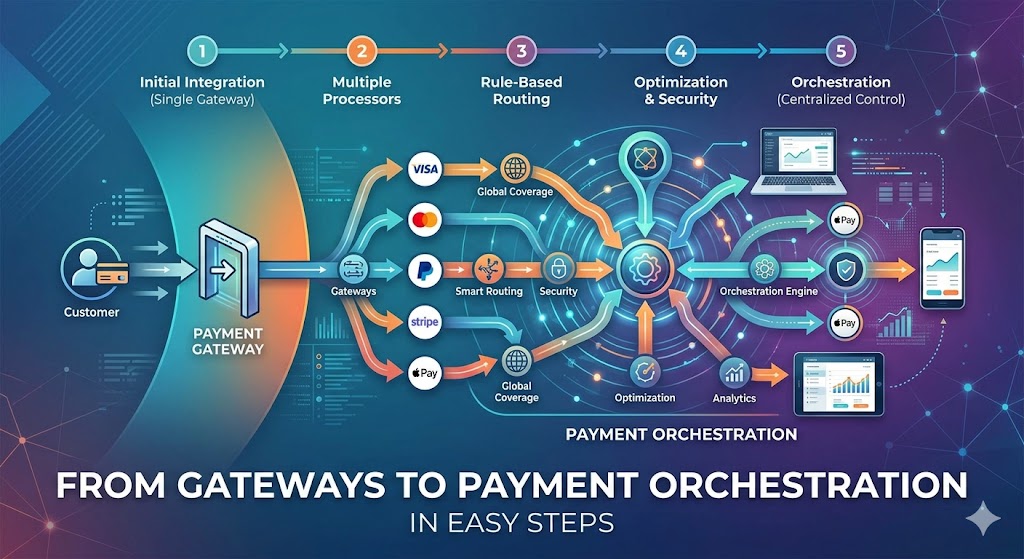
From Gateways to Payment Orchestration in Easy Steps

From Gateways to Payment Orchestration in Easy Steps

Payments have changed. The old way of connecting to a single payment gateway no longer cuts it. Today, businesses need speed, flexibility, and global reach. Therefore, payment orchestration platforms have stepped in — and they are reshaping the entire payments landscape.

In 2025, the global payment orchestration market is projected to exceed $3.5 billion. That growth tells a clear story. Merchants want smarter payment infrastructure. Traditional gateways simply cannot keep up.

What Is a Traditional Payment Gateway?

A payment gateway is a tool that connects a merchant’s checkout to a payment processor. It handles card data, checks for fraud, and passes transactions to the bank. PayPal, Stripe, and Square are well-known examples. However, they each have limits.

Most traditional gateways lock you into one provider. Consequently, if that provider has an outage, your payments stop. Additionally, their routing logic is fixed — they cannot automatically switch to a better path when needed.

For small businesses, this setup works fine. However, as businesses scale, the limitations become painful. High decline rates, single-currency restrictions, and rigid pricing structures hold merchants back.

From Gateways to Payment Orchestration in Easy Steps

What Is a Payment Orchestration Platform?

A payment orchestration platform sits on top of multiple payment service providers (PSPs), gateways, and acquirers. Instead of using one gateway, it connects to many — and intelligently routes each transaction to the best option available.

Think of it like a smart traffic system for your payments. Moreover, it watches each route, picks the fastest and cheapest, and switches automatically when conditions change. The result is higher approval rates, lower costs, and fewer failed transactions.

Leading platforms in this space include Spreedly, Primer, Gr4vy, and Payrails. Each offers smart routing, a single integration point, and real-time analytics. Furthermore, they support dozens of payment methods across multiple regions.

Key Reasons Payment Orchestration Is Winning

First, let’s talk about approval rates. Traditional gateways send each transaction down one path. If that path fails, the transaction declines. Payment orchestration platforms use intelligent retry logic. Therefore, if one gateway declines a payment, the platform automatically tries another — often without the customer even noticing.

Second, consider fees. Different gateways charge different rates for different card types, currencies, and regions. Orchestration platforms route transactions to whichever gateway offers the lowest cost for each specific payment. Consequently, merchants save significantly on processing fees at scale.

Third, look at flexibility. Merchants can add new payment methods — like Buy Now Pay Later, digital wallets, or local payment options — through one platform rather than building individual integrations. This dramatically reduces development time.

How Smart Routing Works

Smart routing is the core feature of payment orchestration. It uses rules and real-time data to decide which gateway handles each transaction. These rules can be based on currency, card type, transaction value, customer location, or historical success rates.

For example, a UK merchant processing a Euro payment from Germany might route it through a European acquirer to avoid cross-border fees. Meanwhile, a high-value transaction might go through a gateway with the best fraud detection for that amount.

Additionally, orchestration platforms offer cascade routing. If the primary gateway declines, the transaction cascades to the next best option automatically. Studies show this approach can recover 5-15% of transactions that would otherwise be lost. That is a significant revenue gain.

Better Data and Analytics

Traditional gateways provide basic reporting. However, payment orchestration platforms deliver deep, real-time analytics across all connected gateways. Merchants can see exactly which gateway performs best for which transaction type.

Furthermore, they can A/B test routing rules to continuously optimise performance. This data-driven approach helps teams make smarter decisions faster. Additionally, consolidated reporting across all PSPs saves hours of manual reconciliation work each month.

Payment orchestration also makes compliance easier. Centralised tokenisation across gateways reduces PCI scope. Moreover, unified fraud management across providers gives merchants a complete view of risk — rather than fragmented data across multiple dashboards.

Global Payments Made Simple

Expanding internationally is one of the biggest payment headaches for merchants. Different countries have different preferred payment methods, currencies, and regulations. Traditional gateways struggle here. Orchestration platforms were built for this challenge.

With a single orchestration platform, a merchant can accept Alipay in China, iDEAL in the Netherlands, UPI in India, and PIX in Brazil — all through one integration. Consequently, global expansion becomes a routing decision rather than a development project.

This is especially valuable for ecommerce brands entering new markets. Instead of spending months integrating local payment providers, they simply activate new connections within the orchestration layer.

The Cost Case for Orchestration

Some businesses hesitate over orchestration platform fees. However, the ROI is usually clear. Consider a business processing $10 million per year. Even a 0.1% improvement in approval rates recovers $10,000 in revenue. A 0.2% reduction in processing fees saves $20,000.

Moreover, reducing failed transactions improves customer experience. Fewer declined cards means fewer abandoned carts and fewer frustrated customers calling support. Therefore, the business case extends well beyond the payment team.

Additionally, reduced development costs matter. One integration replaces many. Engineering teams spend less time maintaining payment connections and more time building product.

Is Payment Orchestration Right for Your Business?

Not every business needs a full orchestration platform right away. However, if you process more than $1 million per year, operate across multiple countries, or experience a decline rate above 5%, it is worth exploring. Furthermore, if you are planning international expansion, starting with orchestration now will save a lot of pain later.

Start by auditing your current payment stack. Look at your decline rates by gateway, by card type, and by region. Additionally, calculate how much you spend on processing fees across all providers. That data will show you exactly where orchestration can help most.

The Future of Payments Is Orchestrated

Traditional payment gateways served their purpose well. However, the demands of modern commerce have outgrown them. In conclusion, payment orchestration platforms offer the intelligence, flexibility, and global reach that today’s merchants need.As payments become more complex, orchestration becomes more essential. Consequently, businesses that adopt these platforms early will process smarter, scale faster, and convert better than those that stick with legacy gateway setups. The shift is already well underway — and it is only accelerating.

Read More:

Why Indian fintechs Lead in API First Tech

UPI Complete Guide: Choosing the Right Payment App

Everything You Need to Know About Payment Gateway Before Launching Your Subscription Box

Why generative ai is the Future of E-commerce

Why Generative AI is the Future of E-commerce: Full Guide

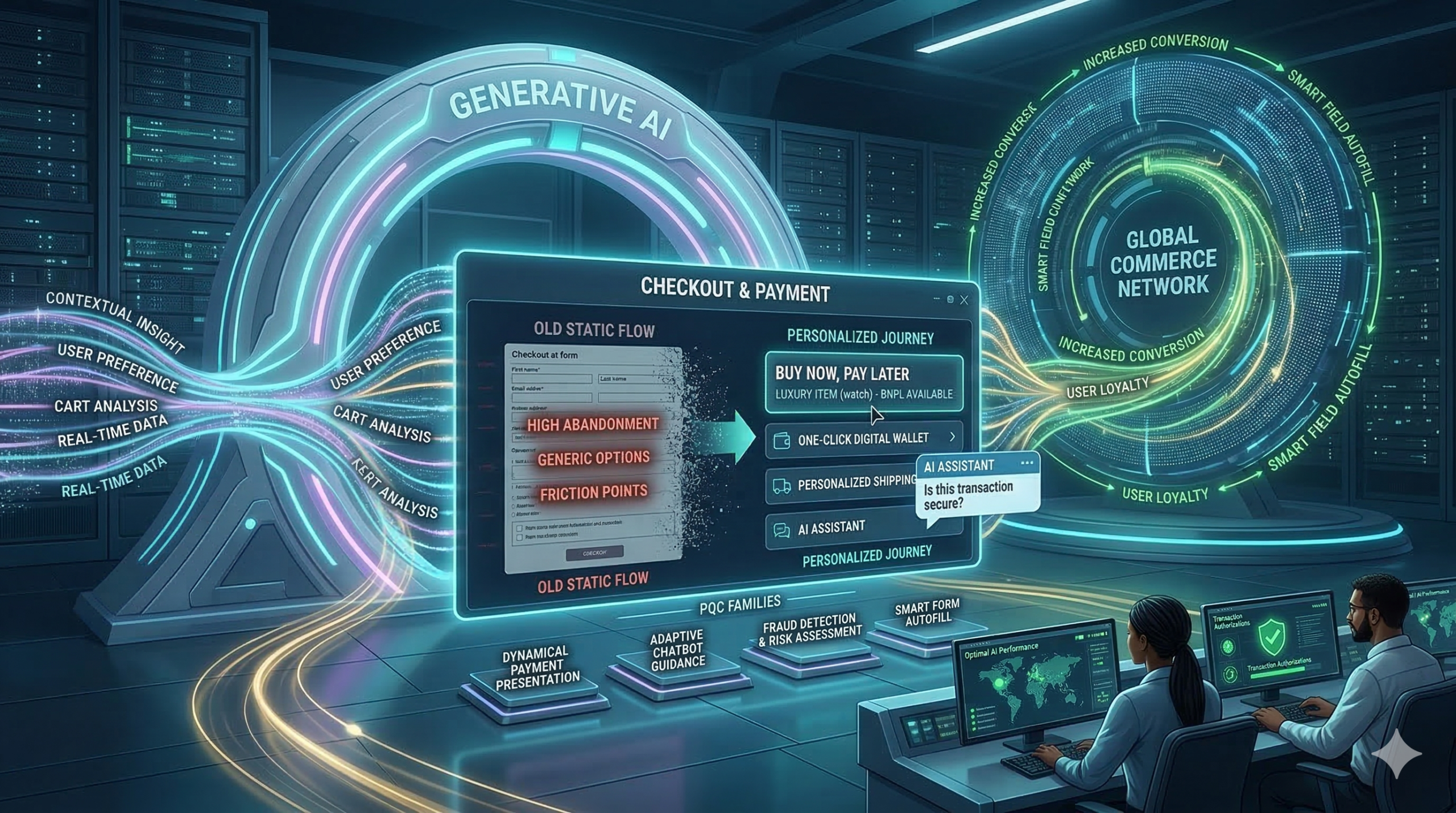
Most online stores lose customers at the final step because traditional checkout pages are often slow and boring. Now, generative ai is changing that forever by creating a personal path for every shopper. Because this technology learns what you like and how you want to pay, buying things online is faster than ever. Furthermore, smart stores use generative ai to turn one-time shoppers into loyal fans. This shift is vital for any brand that wants to grow. Consequently, the payment journey is no longer just a task; it is an experience.


Why Old Checkout Systems Fail

Static forms are the biggest enemy of sales because most shops show the same fields to everyone. Consequently, many people leave their carts empty. This is because the process feels long and hard. Generative ai solves this by making every page unique for the user. For instance, it knows if you are on a phone or a laptop. Furthermore, it predicts which payment method you prefer. Therefore, you spend less time typing and more time enjoying your purchase. In short, it removes the friction that kills sales.

Why generative ai is the Future of E-commerce

Real-Time Help with Generative AI

Shopping can sometimes feel confusing, especially when you have questions about shipping or taxes. Standard help pages are often hard to find. However, generative ai adds a smart assistant to the page to guide you. This bot answers your questions in seconds. Because the bot knows your cart, it gives perfect advice. This builds trust and keeps you moving forward. In addition, it makes sure you never feel alone while shopping.

Moreover, these bots can offer special deals at the perfect moment. If you hesitate, the generative ai might give you a small discount to help you decide. As a result, shoppers feel valued and safe. It is not just a tool; it is a digital guide. Because of these benefits, top brands are moving to AI today. Therefore, the checkout flow becomes a conversation instead of a form.


Safer and Faster Payments

Security is the most important part of any sale because hackers are always looking for ways to steal data. Luckily, generative ai is great at spotting fraud by looking at millions of data points in real-time. If it sees something odd, it stops the threat fast. This keeps your money and data very safe. Because the generative ai is so smart, it rarely blocks real customers. Thus, it makes payment security much stronger for everyone.

Additionally, it helps with filling out forms by guessing your address with high accuracy. This reduces errors and saves time for the customer. When you use it, the checkout flow feels like magic. You just click and go. Therefore, the risk of a mistake is very low. This is the future of generative ai in the payment world. Finally, this technology ensures that safety does not come at the cost of speed.


The Big Future of Generative AI

We are only at the start of this change. Soon, every store will use generative ai to talk to us. It will know our size, our style, and our budget. This means we will see fewer ads we do not like. Instead, we get a tailored world of products. It makes every transaction feel human. It is the best way to shop in 2026. If you want to stay ahead, you must use generative ai now. In conclusion, the personalized payment journey is the new standard for global trade.


Frequently Asked Questions

1. Is generative ai safe for my credit card?

Yes, it improves security by spotting fraud much faster than older systems.

2. Does generative ai make my phone slow?

No, most of the work happens on fast servers, so your phone stays quick.

3. Why do stores need generative ai?

It helps them sell more by making the checkout process easy and personal for everyone.

4. Can generative ai help with returns?

Yes, it can guide you through the return process and answer policy questions instantly.

5. Will all stores use generative ai soon?

Yes, it is becoming the global standard for all top e-commerce websites.


Read More:

The Quantum Threat: Why Payment Security Must Evolve Today

Why Europe Now Dictates Global Payment Standards?

How the new digital payments landscape is ending US dollar dominance?


How to Fix Trade Wars & Tariffs Errors in Digital E-Commerce

How to Fix Trade Wars & Tariffs Errors in Digital E-Commerce

You must understand how global politics can change your digital storefront in the world today. Therefore, you should learn about trade wars and tariffs and how they disrupt payment gateways. Truly, a sudden tax hike on foreign goods can break your checkout flow in a single second. Consequently, you can protect your profits by preparing for shifting trade rules in 2026.

Many people think that digital payments are immune to the physical movement of goods. But, the reality is that payment gateways must adapt to every new tax law or border fee. Always remember, a stable and compliant store is a strong signal for any search engine. This ensures that your brand stays reliable and your customer trust stays very high. This approach requires you to look at how global disputes impact your daily sales math. It helps you build a much more agile business for the long term. It makes your daily international trade feel much more secure and very effective.

How to Fix Trade Wars & Tariffs Errors in Digital E-Commerce

Why Tariffs Break Your Digital Checkout

First, you must see how a new tariff creates instant friction at your payment window. Why does a trade war between two nations make your checkout page slow or broken in 2026? Clearly, your gateway must calculate new import duties for every single order in real-time. Therefore, you must use smart tools to handle these sudden cost changes today.

The Impact of Trade Wars on Your Sales Flow

Here are several reasons why global disputes hurt your payment experience right now:

  • Dynamic Pricing: Your gateway must update prices every time a new tariff starts.
  • Hidden Fees: Customers get angry when they see extra tax costs at the final step.
  • Payment Failure: Some gateways might stop working in certain countries due to bans.
  • Slower Speeds: Calculating complex global taxes adds time to your page load speed.
  • Refund Issues: Handling returns becomes much harder when taxes change every week.
  • Compliance Stress: You must follow new rules for every nation you sell to today.
  • Search Engine Value: Slow or broken checkouts can hurt your site’s organic ranking.

Truly, these shifts solve the mystery of why your global sales might drop during a trade war. But, you must also remember that a clear tax display helps keep your customers very happy. This keeps your brand honest and prevents any sudden loss of sales for your firm. It creates a very high and professional standard for your daily digital security.


Protecting Your Margins with Multi-Gateway Setups

So, how do you keep your money flowing when one payment path gets blocked? Truly, relying on just one gateway is a very risky plan in the unstable world of 2026. Consequently, you should use a “Multi-Gateway Strategy” to stay safe and very fast. It acts as a direct shield against political shifts that could shut down your shop.

Building a Strong Digital Payment Shield

Here is how you can keep your payments moving during a trade dispute:

  1. Failover Paths: If one gateway fails, the system moves the sale to another path.
  2. Local Processing: Use gateways based in the same country as your buyer to save.
  3. Tax Automation: Link your store to tools that update tariff costs every hour.
  4. Currency Hedging: Protect your profits from wild swings in money value today.
  5. Alternative Methods: Offer crypto or local wallets to bypass traditional bank bans.
  6. Transparent Docs: Show the full cost, including tariffs, before the user clicks buy.
  7. Trust Rankings: A working checkout helps you maintain a top search engine rank.

Furthermore, this improves your search engine performance by showing your site is reliable. It makes your company look very smart and ready for 2026 market shifts. This ensures that your brand stays alive even when nations are fighting over trade rules. It creates a very fast and clear path for your professional marketing success.


Navigating Changes in Cross-Border Logistics

The third phase involves linking your payments to your shipping and warehouse data. Clearly, a tariff on shoes might not be the same as a tariff on electronic gear. Therefore, you should use AI to tag your products with the right tax codes today.

Linking Your Payments to Physical Trade Rules

Firstly, audit your product list to see which items face the highest trade risks. This allows you to adjust your focus to more stable markets or goods in 2026. Secondly, work with logistics partners who offer “Duty Paid” shipping for your global fans.

Furthermore, use transition words in your shipping policy to explain any price changes clearly. Also, remember that a smooth delivery path helps your search engine authority and trust. Lastly, check if your “Payment Partner” offers special rates for certain trade zones. Truly, a connected plan is the best tool for surviving a global trade war right now. It allows you to stay ahead of the news and keep your profit margins very safe. This is why top e-commerce brands are moving toward “Agile Trade” models today.


Measuring the Real Cost of Trade Disruptions

The fourth phase is where you use your data to see how much tariffs are eating your profit. Clearly, you must know if selling to a specific country is still worth your time in 2026. Therefore, you must track your “Net Profit Per Region” every single month.

Metrics for a Global Trade Business

Firstly, track the “Cart Abandonment Rate” specifically on pages with high import taxes. This helps you see if your customers are running away from the extra tariff costs today. Secondly, calculate the “Gateway Success Rate” for every country you serve right now.

Furthermore, look for any “Forex Losses” caused by trade wars shifting currency values. Also, use your data to see if a better tax tool leads to higher “Customer Retention.” Lastly, check your search engine ranking to see if site stability helps your traffic. Truly, a data-led path is a journey that leads to a much stronger brand. It turns a messy world into a series of smart, secure wins for your team. This ensures your business stays strong while others face empty bank accounts.


Leading Through Trade Uncertainty

Finalizing your plan requires you to stay updated on global news and trade laws. It needs you to be flexible and ready to move your sales focus at any given moment. Clearly, a safe global store is a team effort for your whole company in 2026. Therefore, follow these simple tips to keep your trade business fresh and very fast.

Simple Tips for Lifelong E-Commerce Success

Firstly, sign up for trade news alerts so you know when new tariffs are coming. This helps you update your payment gateway settings before the law takes effect today. Secondly, encourage your team to find local suppliers to avoid high border taxes entirely.

Furthermore, use transition words in your buyer emails to keep the message very helpful. Also, remind your staff that being honest about costs helps earn more search engine trust. Lastly, check your search engine data to see if your global reach helps your web traffic grow. Truly, a smart path is a journey that leads to a much better brand in 2026. It builds a path of profit that lets your whole team grow very fast. This secures your future in the digital world for a long time.


Frequently Asked Questions (FAQs)

Q1: Can a trade war shut down my payment gateway?

Yes, certain political sanctions can stop specific gateways from working in targeted countries.

Q2: How do I calculate global tariffs automatically?

You should link your e-commerce store to a tax automation tool like Avalara or TaxJar.

Q3: Does a slow checkout due to tax math hurt my SEO?

Yes, high bounce rates and slow page speeds are negative signals for most search engines.

Q4: Should I stop selling to countries with high tariffs?

Not necessarily, but you should adjust your prices or find local partners to keep profit.

Q5: Is it safer to use local currency for all my global sales?

Using the buyer’s local currency often improves trust, but you must watch for exchange risks.

Also read: How to use FIEO BriskPe partnership for global sales